Sign-in methods 🔐
Supported sign-in methods
Section titled “Supported sign-in methods”
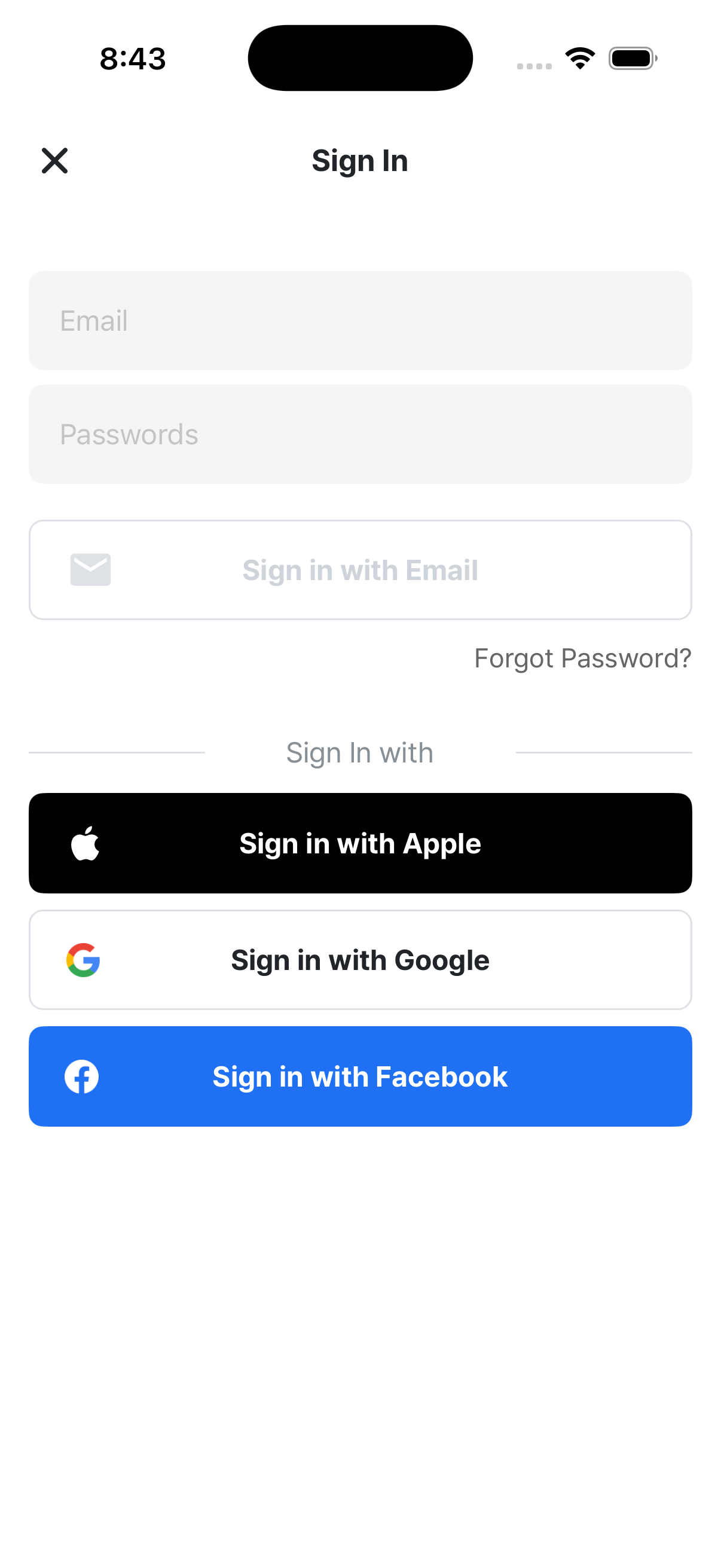
RedKiwi supports the following sign-in methods. Which buttons you see depends on your device and language settings.
| Method | When it shows |
|---|---|
| 📧 Email + password | Everyone |
| Everyone | |
| Everyone | |
| ⚫ Apple | iOS devices only |
| 🟡 Kakao | When the app language is Korean |
| 💚 LINE | When the app language is Japanese |
⚠️ Important: sign in with the same method you used to sign up
Section titled “⚠️ Important: sign in with the same method you used to sign up”Trying a different sign-in method than the one you signed up with creates a totally separate account.
Examples:
- Signed up with Google → tried Kakao → created a new, different account
- Your existing study record stays in the original Google account
If you can’t remember which method you used:
- Try the SNS you use most (Google or Kakao are most common)
- If not, try Apple (iPhone users) or LINE
- If nothing works, contact support
🔗 SNS account linking
Section titled “🔗 SNS account linking”You can link several sign-in methods to one account. Once you do, signing in with any of them takes you to the same account.
How to add a link
Section titled “How to add a link”- Settings → Account info → “SNS account linking”
- Pick the SNS you want to link
- Complete the SNS sign-in
- Done!
Unlinking
Section titled “Unlinking”Same screen — tap “Unlink.” Note: your last remaining sign-in method can’t be unlinked (otherwise you’d have no way to sign in).
Kakao linking note
Section titled “Kakao linking note”When you link Kakao, your marketing consent is automatically reflected in your profile.
🔍 Checking what’s linked
Section titled “🔍 Checking what’s linked”You can see all currently linked sign-in methods in Settings → Account info.
The ones marked “Connected” are currently active sign-in methods.
Password rules (email login)
Section titled “Password rules (email login)”- At least 6 characters
- No spaces
Common errors
Section titled “Common errors””The email address you have entered is not registered.”
Section titled “”The email address you have entered is not registered.””- No account exists with this email
- Maybe you signed up via SNS — try that instead
”The password is incorrect.”
Section titled “”The password is incorrect.””- You’ll need to reset your password
- On the sign-in screen, tap “Forgot password” to get a reset link
”You’ve exceeded the password reset attempt limit.”
Section titled “”You’ve exceeded the password reset attempt limit.””- Wait a while and try again (security limit)
“This email is already in use.” (during signup)
Section titled ““This email is already in use.” (during signup)”- An account with this email already exists
- Try signing in on the sign-in screen
”This account is deactivated.”
Section titled “”This account is deactivated.””- You’ll need to contact support
”Please sign in again.”
Section titled “”Please sign in again.””- For sensitive actions (changing email, deleting account), recent sign-in is required
- Sign out and back in → retry
Signing out
Section titled “Signing out”Settings → Logout button → “Do you really want to logout?” confirmation → signed out.
Signing out doesn’t delete your account. Sign back in with the same method and your study record returns intact.