Medals 🏅
What are medals?
Section titled “What are medals?”A performance grade you earn each time you finish a video’s puzzle. Your result on a video gets recorded as one of four medals, so you can see how well you handled it at a glance.
- 🥉 Bronze
- 🥈 Silver
- 🥇 Gold
- 🏆 Master
Why do medals exist?
Section titled “Why do medals exist?”If you just listen to a video and move on, very little of it sticks. Medals create a tiny goal: “Let me try a little harder this time.”
- An anchor for focus — they nudge you to take the puzzle a bit more seriously, which means hearing each word more clearly.
- A reason to come back — wanting to upgrade a video from Bronze to Master is itself a reason to review.
- Visible growth — if a re-attempt gets a higher medal, your listening has measurably improved.
Don’t think of it as a stressful score system — think of it as “a little something that makes you want to try again.”
How are they decided?
Section titled “How are they decided?”The medal depends on how many words you got wrong in that video’s puzzle.
- All correct → Master
- More mistakes → Gold → Silver → Bronze, dropping a tier as the count grows
“Check your medal — The medal you get changes depending on how many words you get wrong. If you get all the words correct, you’ll get a master medal.”
While you solve the puzzles, the player’s top bar shows the medal you’d earn right now in real time. Once you finish the last sentence, that medal is finalized and saved.
Where to see them
Section titled “Where to see them”1. The 🏅 icon in the Home tab header
Section titled “1. The 🏅 icon in the Home tab header”There’s a medal icon and total points display in the upper right of the Home tab. Tap it to open the medal screen.
2. Medal screen
Section titled “2. Medal screen”Shows every medal you’ve earned, broken down by tier:
- Counts per tier (Bronze / Silver / Gold / Master)
- Total points
- Share button — show off your medals to friends / on social media
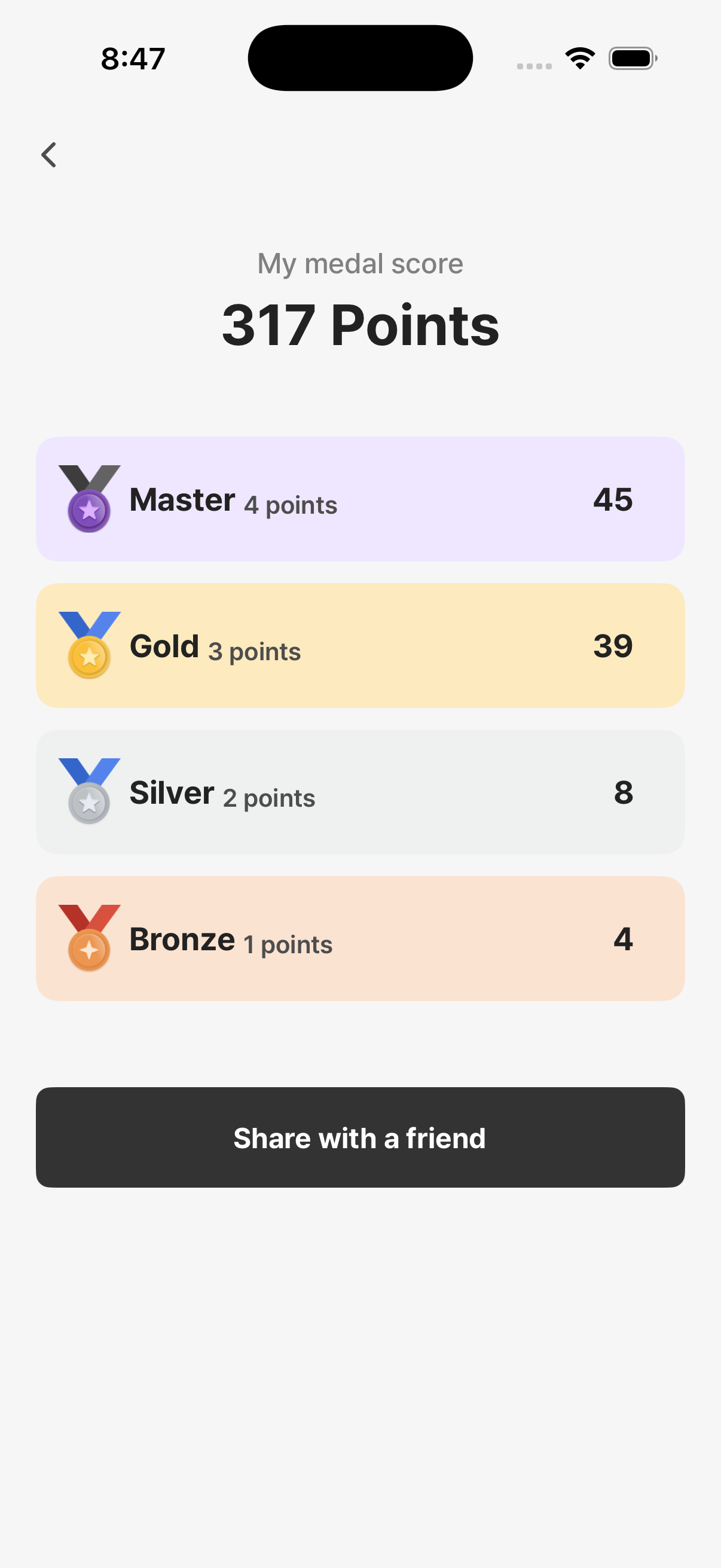
3. The video player top bar (during a quiz)
Section titled “3. The video player top bar (during a quiz)”While solving, you can see “the medal you’d get if you stopped now” in real time. Want to know if one more correct word bumps you up a tier, or whether Master is already locked in? It’s right there.
4. Medal filter in the Library
Section titled “4. Medal filter in the Library”On the completed-videos list, you can filter by medal tier. Try things like “show me only Master medals” or “find Bronze medals to retry.”
What if I redo a video?
Section titled “What if I redo a video?”On a completed video, you’ll see a “Study again” button. Tap it, and you’ll be warned that the existing record will be cleared; confirm and that video’s record is wiped, letting you start over from scratch.
The new medal overwrites the old one. If a video that was originally Bronze ends up Master after a retry, it’ll show as Master from then on. But: it’s not “best result preserved” — it’s “last result overwrites.” So a worse retry can drop you down (e.g., Master → Silver).
→ Even if your first attempt didn’t go great, you can come back. No pressure on the first run; come back when you feel ready.
What can I do with medals?
Section titled “What can I do with medals?”Medals are for tracking achievement and sharing. There are no membership locks or rewards tied to them. But they do:
- Let you see “how much I’ve actually done” at a glance
- Motivate you to come back for a Master attempt
- Give you something to share with friends / social media
- Don’t aim for Master on the first try — if you don’t know the video, getting Bronze is fine. The natural flow is to come back and upgrade after some learning has accumulated.
- Use the medal filter to pick re-attempt candidates — filtering Library by Bronze/Silver pulls out the videos worth a retry.
- Don’t watch the top-bar medal preview — it can break your concentration. Focus on the puzzle and check the result afterward.